
A remediation is approved. How does it reach only the intended machines?
Resolve the target, attach the approved playbook, and put the work into a visible queue before an enrolled agent receives it.
Capability
Run defined operational work through enrolled agents with signed playbooks, explicit target scope, visible queue state, and retained output.
Enrolled agents
Signed playbooks
Scoped queue
Schedules and routines
Operational need
Known work can be scoped, dispatched, observed, repeated, and reviewed without turning every action into an untracked bespoke operation.
Operating signals
What you get
Where it starts
These examples enter the product surface that owns their state. They do not all become a case, ticket, owner, or shared evidence record automatically.
Resolve the target, attach the approved playbook, and put the work into a visible queue before an enrolled agent receives it.
Use explicit assignment and per-agent variables so repeatable work stays tied to the machines and parameters it was prepared for.
Inspect the execution queue by agent and state, then open the full record instead of polling terminal sessions.
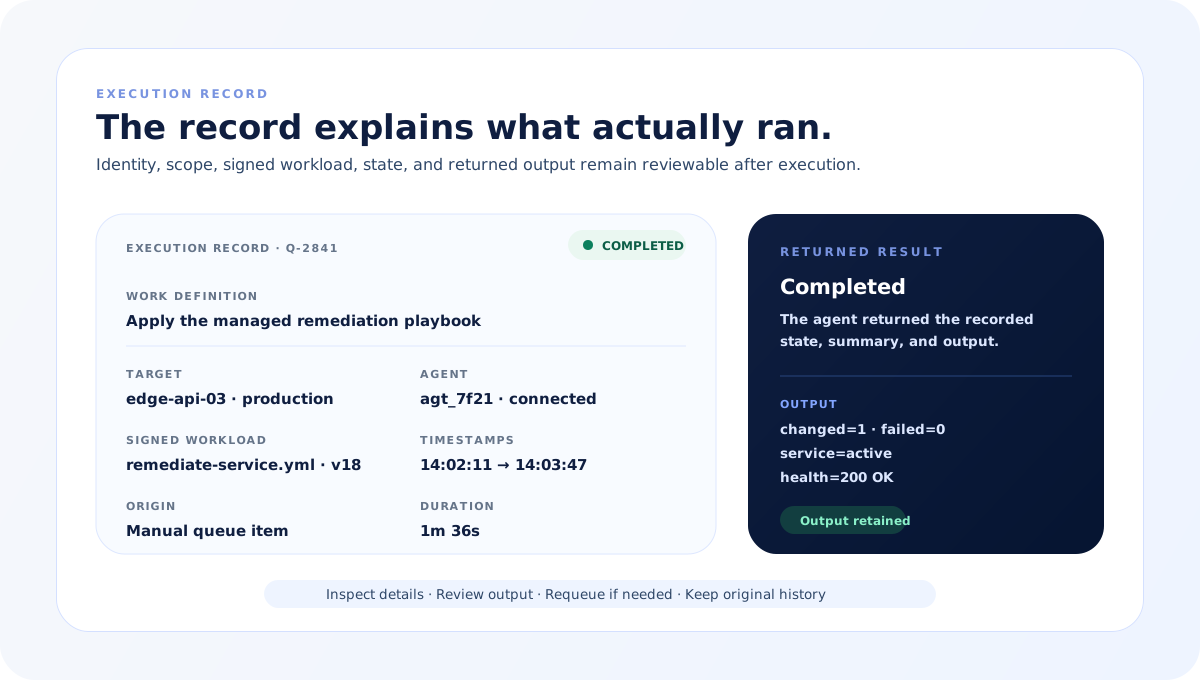
Keep the result summary, returned output, timestamps, metadata, and failure context attached to the queue item.
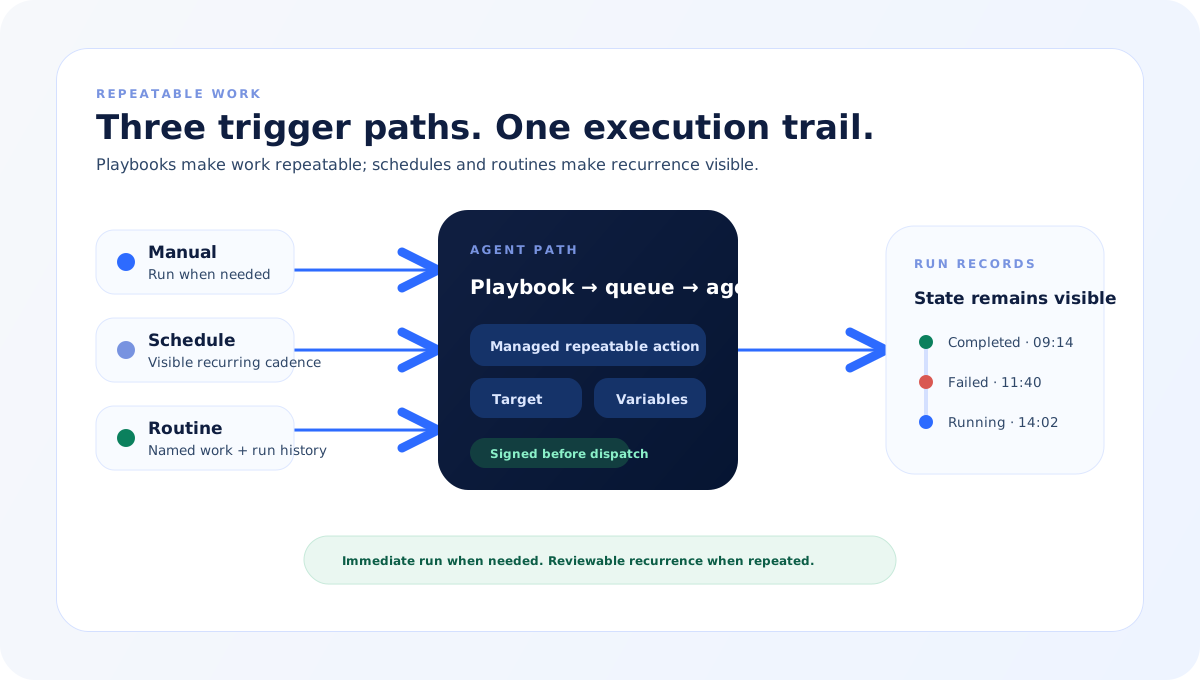
Move repeat work onto a visible cadence with an immediate-run option and retained run history instead of hiding it in cron.
Retain the action path and result so an operator can review, cancel, requeue, or repeat work from the product record.
How it works
The product path below names its inputs, decisions, controls, and output without implying the same lifecycle applies to every capability.
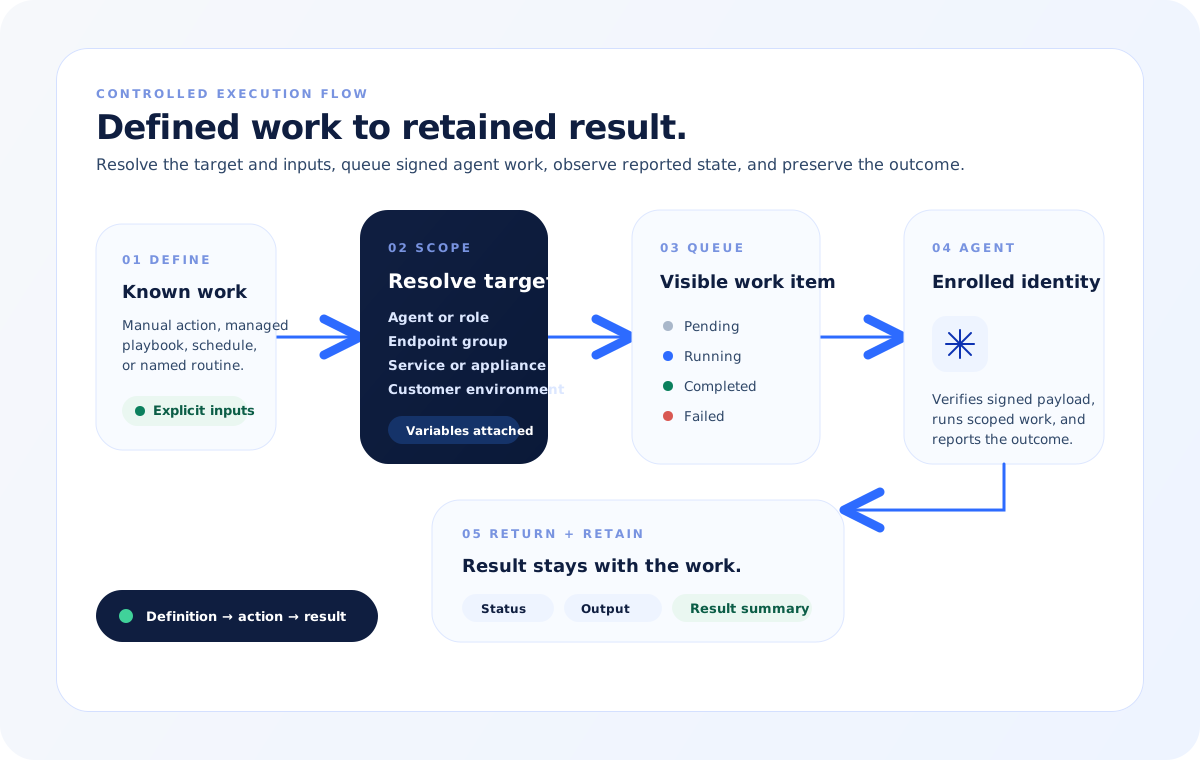
Start from a reviewed action, managed playbook, named routine, or visible schedule with defined target and inputs.
Choose the agent, role, endpoint group, service, appliance, or customer environment and confirm the variables that apply.
Create a visible work item and send the signed payload through the controlled queue to the enrolled agent when agent execution is used.
Track pending, running, completed, or failed state together with returned output and failure context.
Keep target, timestamps, result summary, and output with the originating record; requeue eligible terminal work or make recurring work an explicit schedule or routine.
Product model
The diagrams show how defined work becomes a scoped queue item, crosses a signed agent boundary when agent execution is used, repeats through visible schedules or routines, and returns state and output to retained records.
Execution path
A manual action, managed playbook, schedule, or routine resolves its target and inputs before dispatch. Agent-backed work returns state and output to its queue and agent records.
Agent trust boundary
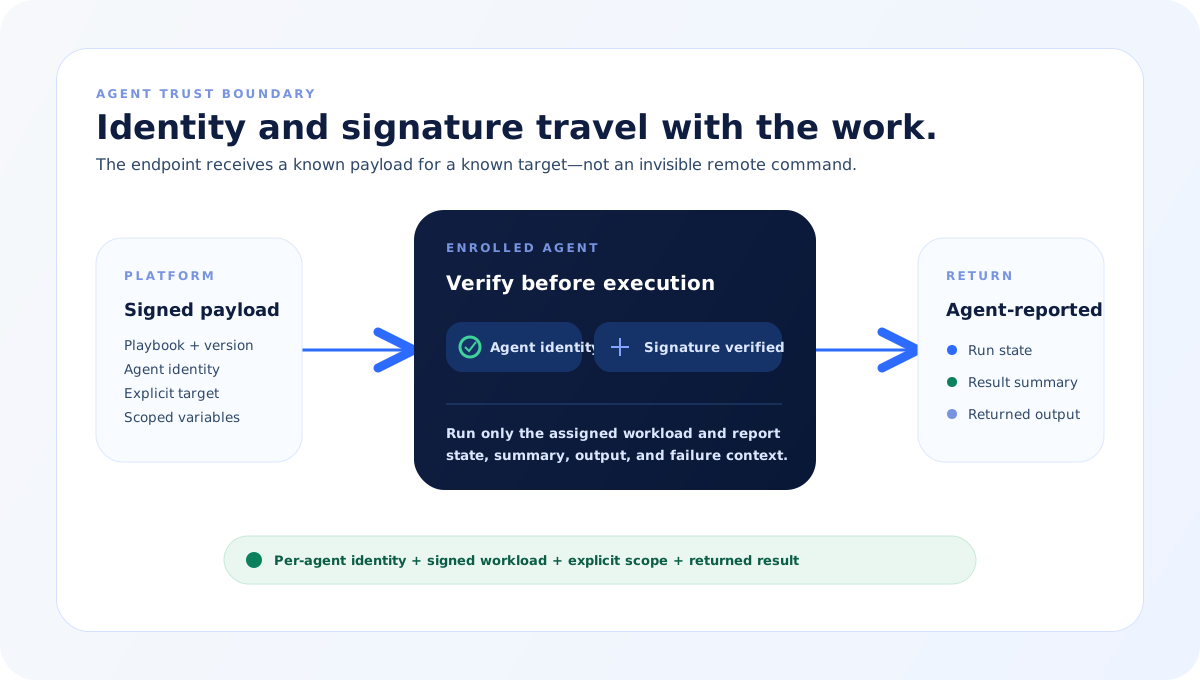
Each enrolled agent has its own identity. The execution payload is signed, the target remains explicit, and the agent reports status and output back through the controlled path.
Repeatable work
Playbooks provide repeatable actions, schedules provide visible cadence and run-now control, and routines retain their own reports and run history.
Execution proof
Queue, agent, schedule, and routine records keep their target, timestamps, state, result summary, output, and failure context available for later review.
What it includes
These parts participate in the workflow. The record shows what was used and why it mattered.
Agent execution
Individually enrolled machines receive signed work and report connection, execution state, result, and output back to the platform.
Agent inventory, identity, heartbeat, and per-agent history
Queues
Operators can filter work by agent and state, inspect full details, cancel pending or running work, and requeue a finished item.
Execution queue and queue-item detail
Playbooks
Managed playbooks can be synchronized from a configured source, reviewed, assigned by scope, parameterized per agent, signed, and dispatched instead of rebuilt manually.
Playbook inventory, configured source, assignment, variables, approval, and signing
Routines
Repeated work can become a named shared or personal routine with manual runs, templates, and retained run reports.
Routine catalog, runner, templates, and run history
Schedules
Playbook work can run on a visible recurring cadence or be triggered immediately from the same schedule record.
Schedule list, recurrence policy, and run-now action
Evidence
Target, state, result summary, returned output, timestamps, metadata, and the originating queue, schedule, agent, or routine record remain available after the run.
Queue history, agent history, and routine run reports
Control model
Integrations, AI assistance, routines, and agents use different permissions and records. The controls below describe this capability rather than a universal approval model.
Action starts from a managed work definition or an explicitly approved proposal—not an implicit AI response.
Agent identity, target scope, assignment, and per-agent variables are explicit before dispatch.
Signed payload verification is part of the endpoint execution boundary.
Pending, running, completed, and failed state stays visible with result summary and returned output.
Operators can inspect work, cancel eligible pending or running items, requeue eligible completed or failed items, and review retained routine runs.
Value over time
Define
Dispatch
Review
Next step
Book a walkthrough and see this workflow mapped to the integrations and controls you already use.